How I Work Now
My development workflow has changed quite a bit over the last few months.
I barely type code anymore.
Most of the time I describe what I want done, hand the work to an agent, and move on to something else while it works. The interesting part is not really that an agent can write code. That stopped being surprising a while ago.
The interesting part is figuring out how to let several agents work at the same time without turning my repositories into chaos, while still keeping the important decisions mine.
This is the setup I use today.
Estimated reading time: 14 minutes
Credit where it belongs: Kun Chen (@kunchenguid) built the entire system described in this article. The only additions in my setup are the voice layer: speech to text and text to speech. What follows is my account of how I use his tools day to day.
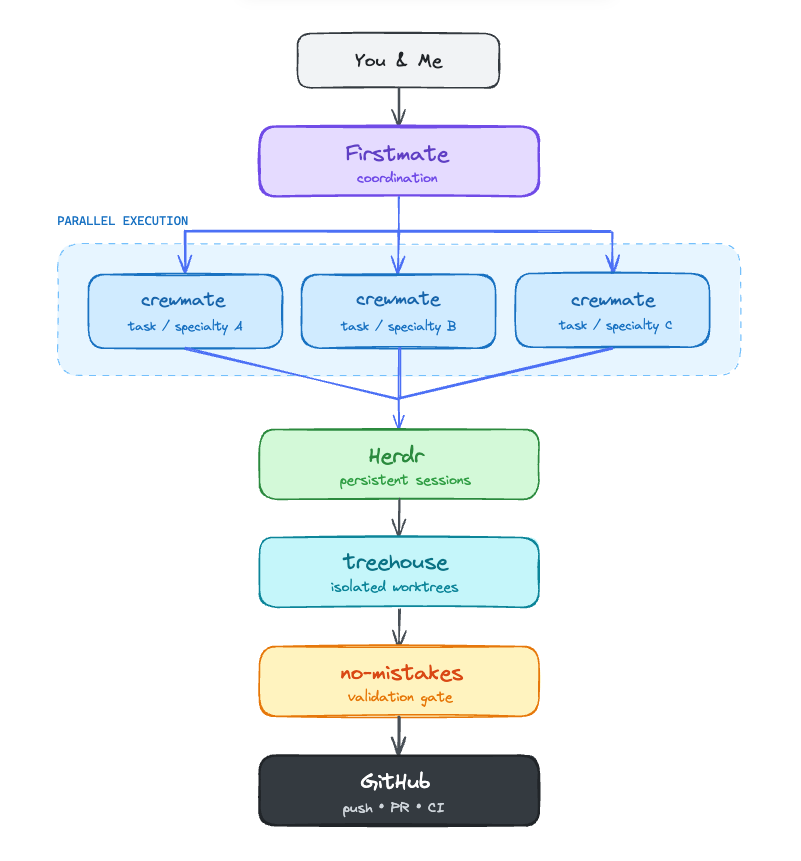
My current agent-development stack: coordination, parallel execution, persistent sessions, isolated worktrees, validation, and GitHub.
The Short Version
I have one agent I talk to, called Firstmate.
Firstmate does not write project code itself. It delegates work to smaller agents called crewmates, each running in its own isolated git worktree.
Those agents live inside Herdr, which gives me one persistent place to see what is running, what is waiting for me, and what has finished.
A crewmate can spend twenty minutes implementing something, another can investigate a bug, another can review a PR, and another can test something in the browser.
Meanwhile I can be doing something completely different.
When a coding task is ready, it does not immediately become a PR either. It goes through no-mistakes, a local validation pipeline that reviews it, tests it, rebases it, checks documentation and only then allows it to reach GitHub.
So the goal is not really:
make one coding task finish as fast as possible
It is closer to:
keep four or five useful things moving at the same time, and only interrupt me when one of them actually needs a decision.
That distinction ended up mattering a lot.
Firstmate: The Agent I Actually Talk To
Firstmate is the entry point for everything.
I give it something like:
Figure out why this API behaves differently after the latest change.
Firstmate turns that into a proper brief and gives it to a crewmate.
There are two kinds of tasks.
| Kind | Produces | Used for |
|---|---|---|
| Ship | A pull request | Actual code changes |
| Scout | A written report | Investigation, diagnosis, review, audit |
I like having this distinction explicitly enforced.
A scout investigating a bug cannot suddenly decide, "I found it, I'll fix it too."
It has no authority to modify the project.
It reports what it found, then I decide whether the finding should become a ship task.
That sounds like a small rule, but agents are extremely eager to be useful. Give one enough freedom and "investigate this behaviour" can quietly turn into "I refactored three files and opened a PR."
I would rather make that transition explicit.
Firstmate also keeps its state on disk: backlog, task statuses, decisions and progress logs.
This turned out to be important too.
If I close my laptop while several agents are working, the system does not depend on some enormous chat history surviving forever. When I come back, Firstmate reconciles what is on disk with what actually happened.
The conversation is just the interface.
The files are the state.
Herdr: Where the Agents Actually Live
The part underneath Firstmate is Herdr.
Herdr is basically the runtime for all those agent sessions.
Before using something like this, parallel agents usually meant having a ridiculous number of terminal tabs open.
One tab has an agent coding.
Another is waiting for an answer.
Another finished ten minutes ago and I somehow missed it.
Another is still running tests.
After a while I was spending more time figuring out which terminal needed me than actually making decisions.
Herdr fixes that problem.
Each agent runs inside a persistent terminal pane, and Herdr tracks whether it is:
- working
- blocked
- idle
So instead of polling terminals manually, I can immediately see which agent actually needs attention.
It also means the terminal sessions are not tied to the terminal window itself.
I can detach, close the terminal, reconnect later and the sessions are still there.
This sounds like a small quality-of-life improvement until you start running several agents at once. Then it becomes pretty fundamental.
The mental model is roughly:
 1me
 2 │
 3 ▼
 4Firstmate
 5 │
 6 ├── crewmate
 7 ├── crewmate
 8 ├── crewmate
 9 └── crewmate
10       │
11       ▼
12     Herdr
Firstmate handles coordination.
Herdr handles the actual running sessions.
I like keeping those responsibilities separate.
treehouse: Giving Every Agent Its Own Repository
Parallel agents are not very useful if they are all editing the same working directory.
That is what treehouse solves.
It maintains a pool of reusable git worktrees. When Firstmate starts a crewmate, that agent gets its own isolated checkout.
So if four agents are working on the same repository, they are really working in four separate worktrees.
My normal checkout stays untouched.
This is probably the least glamorous part of the whole setup, but mechanically it is what makes everything else possible.
Without isolated worktrees, "four agents working in parallel" mostly means four agents fighting over the same files.
The reusable part matters too.
Creating a brand new worktree every time sounds fine until every agent needs to reinstall dependencies, rebuild caches and bootstrap the project again.
Treehouse keeps a pool ready to go.
So isolation stays cheap.
no-mistakes: Code Does Not Get to Push Itself
Once an agent finishes writing code, I do not want the next step to be:
1git push
I want the code to prove that it deserves to be pushed first.
For that I use no-mistakes.
It behaves like a local git gate in front of the real remote.
Instead of pushing directly to GitHub, the change goes through a validation pipeline first.
Conceptually:
1intent → rebase → review → test → document → lint → push → pr → ci
The crewmate runs the pipeline, and the pipeline decides whether the change can continue.
If review finds something wrong, the agent fixes it and runs the pipeline again.
If tests fail, same thing.
Only when everything passes does the change reach GitHub.
What surprised me is how often the useful catches are not syntax errors or lint problems.
Those are easy.
The interesting mistakes are usually things like:
- a wrong assumption
- a missing edge case
- unnecessary scope expansion
- misunderstanding existing behaviour
- code that technically works but does not fit the surrounding design
Those are much harder to catch with a normal linter.
The Approval Gate
Not every review finding has an objective answer.
Sometimes the pipeline reaches something like:
I can fix this by changing the behaviour slightly. Should I?
At that point it stops.
The question goes back through Firstmate and reaches me.
I think this is one of the most important parts of the setup because scope stays mine.
An agent is perfectly capable of solving a problem by making the task bigger.
Sometimes that is correct.
Sometimes it is exactly what I do not want.
The approval gate forces that decision back to me.
I have also had cases where an agent found a real problem, proposed a fix, and the reasoning behind the proposed fix turned out to be wrong.
That distinction matters.
An agent identifying something suspicious does not automatically mean its explanation is correct.
So when a conclusion depends on a particular measurement or behaviour, I still check that part myself.
This is more or less the workflow I want:
the agent does the boring work, gets surprisingly far on its own, and stops close to the point where human judgement becomes valuable.
Browser Testing Is a Separate Problem
One thing I deliberately keep separate from no-mistakes is browser testing.
no-mistakes validates code.
It does not tell me whether a button is in the wrong place or whether some strange frontend flow breaks after the third click.
For that I use chrome-devtools-axi.
It gives agents access to a real browser through Chrome DevTools.
So I can ask a scout to:
- start the application
- navigate through a flow
- click buttons
- inspect console errors
- inspect network requests
- take screenshots
- verify that something actually works from the user's point of view
The useful pattern here is the same as everywhere else.
The agent does everything it can automatically and stops when it reaches something genuinely human-only.
Maybe that is a login.
Maybe I need to look at two designs and choose one.
Maybe the behaviour is technically valid but I simply do not like it.
I handle that part and let the agent continue.
I want as few handoffs as possible, but I want the remaining handoffs to happen at the right places.
GitHub Without Making Agents Read Everything
For GitHub operations I use gh-axi.
It wraps the normal GitHub CLI but formats information specifically for agents.
That sounds slightly ridiculous at first.
Why would an agent need its own CLI format?
Then you watch an agent dump a giant JSON response containing hundreds of fields just to figure out whether a CI check passed.
LLM context is a resource too.
Giving an agent the exact information it needs is usually better than giving it everything and hoping it finds the useful part.
So gh-axi handles things like:
- pull requests
- issues
- CI runs
- reviews
- repository state
but returns the information in a much more agent-friendly form.
The broader project behind this idea is AXI, short for Agent eXperience Interface.
The basic idea is that CLIs designed for humans are not necessarily good interfaces for agents.
I increasingly agree with that.
Reviewing Things That Are Not Code
Not everything I ask an agent to create is code.
Sometimes it is a design.
Sometimes it is an architecture proposal.
Sometimes it is an HTML prototype.
For those I use lavish-axi.
Instead of having the agent describe an artifact in a giant chat message, it can generate HTML and open it as an actual review surface.
I can click on something, annotate it, leave a comment and send that feedback back to the agent.
This feels much better than:
On the second card, the text underneath the title, no not that text, the one slightly below it...
Pointing at things is a surprisingly useful human interface.
OpenSuperWhisper: I Talk Instead of Type
When I say that I barely type code anymore, that includes most of the instructions I give the agent.
I press Ctrl+I, start talking, and OpenSuperWhisper turns what I say into the prompt Firstmate receives.
I have OpenSuperWhisper pointed at a speech-to-text model that I host locally. The audio does not need to go to a third-party transcription service, and I can dictate into the same terminal or application where I would normally type.
This is especially useful for the kind of prompt that contains context, uncertainty and several constraints. Speaking it is faster and more natural than trying to compose the perfect paragraph before the agent can begin.
So the interaction loop is voice at both ends:
1Ctrl+I → speak → local transcription → Firstmate → spoken summary
OpenSuperWhisper handles the input. Kokoro handles the output.
speak: I Got Tired of Reading Agent Updates
The other small thing that changed the workflow more than I expected is text to speech.
Every completed Firstmate response is spoken using the Kokoro text-to-speech model running locally.
This means I do not need to constantly switch back to the terminal just to read:
task finished, tests passed, PR ready
I can hear it while doing something else.
The first version was terrible.
I originally just had an instruction saying that spoken summaries should stay below 70 words.
Agents ignored it.
So now the script simply refuses anything above 70 words.
Then I discovered another problem.
Crewmates inherit some of my instructions. They saw "speak at the end of every reply" and quite reasonably started speaking too.
Suddenly several agents were talking over each other through one pair of speakers.
So now only Firstmate is allowed to invoke the TTS script.
I also added timed silence because sometimes I just want thirty minutes without hearing anything.
Every rule in that script exists because the naive version broke once.
That has become a bit of a theme with this whole setup.
Instructions Live in Files
I do not want to explain my preferences every time I start an agent.
So most behaviour lives in files.
| File | Scope | What it contains |
|---|---|---|
~/CLAUDE.md |
Everything | Coding style, PR limits, formatting preferences, TTS rules, testing conventions |
~/OPINIONS.md |
When relevant | How I tend to think about technical decisions |
AGENTS.md in Firstmate |
Orchestrator | Lifecycle, safety rules, escalation, task handling |
Project AGENTS.md |
One repository | Things every contributor to that repository should know |
I also keep a small memory directory.
One file per durable lesson.
Most of those lessons came from an agent getting something wrong once.
Things like:
1read the history before calling something a bug
2verify claims that depend on external state
3check the measurement before trusting the explanation
The point is not to make the prompt enormous.
It is the opposite.
If I correct something that I expect to matter again, I want the correction somewhere durable instead of hoping I remember to repeat it three weeks later.
What a Normal Hour Looks Like
This is the part that is harder to explain until you actually see it running.
A normal hour might look like this:
- I describe a bug to Firstmate.
- It creates a brief and spawns a crewmate.
- I describe another feature.
- Another crewmate starts in another worktree.
- A scout investigates something I am unsure about.
- Another agent reviews an existing PR.
- One of them reaches an approval gate and Firstmate asks me one question.
- I answer it and go back to what I was doing.
- Another agent finishes and I hear a short spoken summary.
Herdr sits underneath all of this and shows me which sessions are actually running and which ones are blocked.
So I do not sit there polling terminals like:
1done yet?
2done yet?
3done yet?
The agents come back when something changed.
The biggest improvement is not that each individual task became dramatically faster.
It is that I no longer need to hold the entire state of every task in my head.
Each task has its own agent, context, worktree and durable records.
I jump in when there is actually something worth deciding.
What I Still Do Myself
This setup automates a lot, but there are a few things I very deliberately keep for myself:
- deciding scope
- approving merges
- checking important measurements
- making product or design decisions
- rejecting a finding when I think the agent is wrong
Especially that last one.
The biggest risk with coding agents is not that they refuse to work.
They work.
They produce a lot.
The dangerous case is when the output is clean, detailed, confident and slightly wrong.
That is much easier to miss.
The Stack
Put together, the current setup looks roughly like this:
The diagram at the beginning of this article is the core pipeline. Around it sit a few smaller tools:
1chrome-devtools-axi  → browser
2gh-axi               → GitHub
3lavish-axi           → visual review
4OpenSuperWhisper     → voice prompts
5Kokoro               → spoken updates
Each tool is fairly small in responsibility.
That is probably why the combination works.
I do not have one giant "AI development platform" trying to own everything.
I have a few tools connected together, each solving one annoying part of the workflow.
Why This Hasn't Fallen Apart
After using this setup for a while, I think three things are doing most of the work.
1. Agents cannot reach the things that really matter
Firstmate does not write project code.
Scouts cannot modify the repository.
Agents do not merge things by themselves.
My primary checkout stays separate.
These are not instructions saying:
please don't do this
They are enforced by tooling.
That distinction matters.
LLMs are probabilistic.
Safety boundaries should preferably not be.
2. The state survives the conversation
Agent context windows end.
Terminals close.
Laptops restart.
The backlog does not care.
Firstmate keeps the task state on disk.
Herdr keeps the sessions alive.
Treehouse keeps the working directories isolated.
The chat itself is not responsible for remembering the whole system.
I have become increasingly convinced that this is the right way to build long-running agent workflows.
The chat should not be the database.
3. Verification assumes the agent might be wrong
This is probably the biggest one.
The implementation gets reviewed.
Tests run.
Browser behaviour gets checked separately.
Important claims can be reproduced.
Agents can investigate the output of other agents.
I do not think the interesting future of coding agents is:
make the model so good that it never makes mistakes
That seems like the wrong bet.
I would rather assume mistakes will happen and build a workflow where they are cheap to catch.
Once I started thinking about it that way, the whole setup became much simpler.
I am not trying to build an agent I can trust blindly.
I am trying to build a system where I don't have to.
2 comments
Nice setup, i'm not a fan of using so many tools on top of my coding agent but this looks cool :)
Yeah, totally fair! I wouldn’t use all of this for one task either. For me the value really shows up when I’m juggling several tasks across multiple repos at the same time. Without some orchestration around the agents, keeping track of what is running, blocked, finished, or sitting in which worktree becomes pretty much impossible :(