Building My Engineering Journal: From Obsidian Vault to Deployed Blog
This is a full technical breakdown of how I built Engineering Journal, my personal knowledge for daily notes and weekly articles on backend engineering, distributed systems, and computer science.
The goal was to make something minimal, fast, and elegant, entirely built in Go, HTML, HTMX (no javascript) and Tailwind CSS.
Motivation
Whenever I learn something new, I tend to forget it unless I write it down in my own words. That’s why I use Obsidian to take notes while reading technical books or following online courses. It’s simple, fast, lightweight, and even has Vim keybindings.
To motivate myself to learn something every day (or at least try), I decided to start writing daily notes, short summaries of whatever I learned that day, and weekly articles that go deeper into a topic.
The problem was: I already write everything in Obsidian, and I love it. It syncs with GitHub, works across devices, and doesn’t get in the way. So I thought, why not publish directly from Obsidian? What if I could just write, save, and let everything happen automatically?
That’s when the idea for Engineering Journal came: a blog that updates itself whenever I write. No manual steps, just writing, and letting the system handle the rest.
The Idea
I wanted a simple site that:
- Syncs with my Obsidian vault
- Parses Markdown and renders notes and articles
- Deploys automatically whenever I push updates
- Looks clean, fast, and mobile-friendly
So I built everything in Go, with a lightweight frontend rendered server-side using templ.
Tech Stack
| Layer | Technology | Purpose |
|---|---|---|
| Backend | Go 1.25 | Core logic, routing, and rendering |
| UI Templates | templ | Type-safe HTML components rendered server-side |
| Styling | Tailwind CSS | Utility-first CSS framework |
| Database | PostgreSQL | Stores parsed notes, metadata, and tags |
| Parser | Goldmark, Bluemonday, Chroma | Markdown → HTML, cleaning, and syntax highlighting |
| Deployment | Dokploy | CI/CD, HTTPS, and auto-redeploy on push |
| Content Source | Obsidian Vault | Notes written locally and synced automatically |
Everything runs as a single Go binary handling both the HTTP server and the content syncer.
Architecture Overview
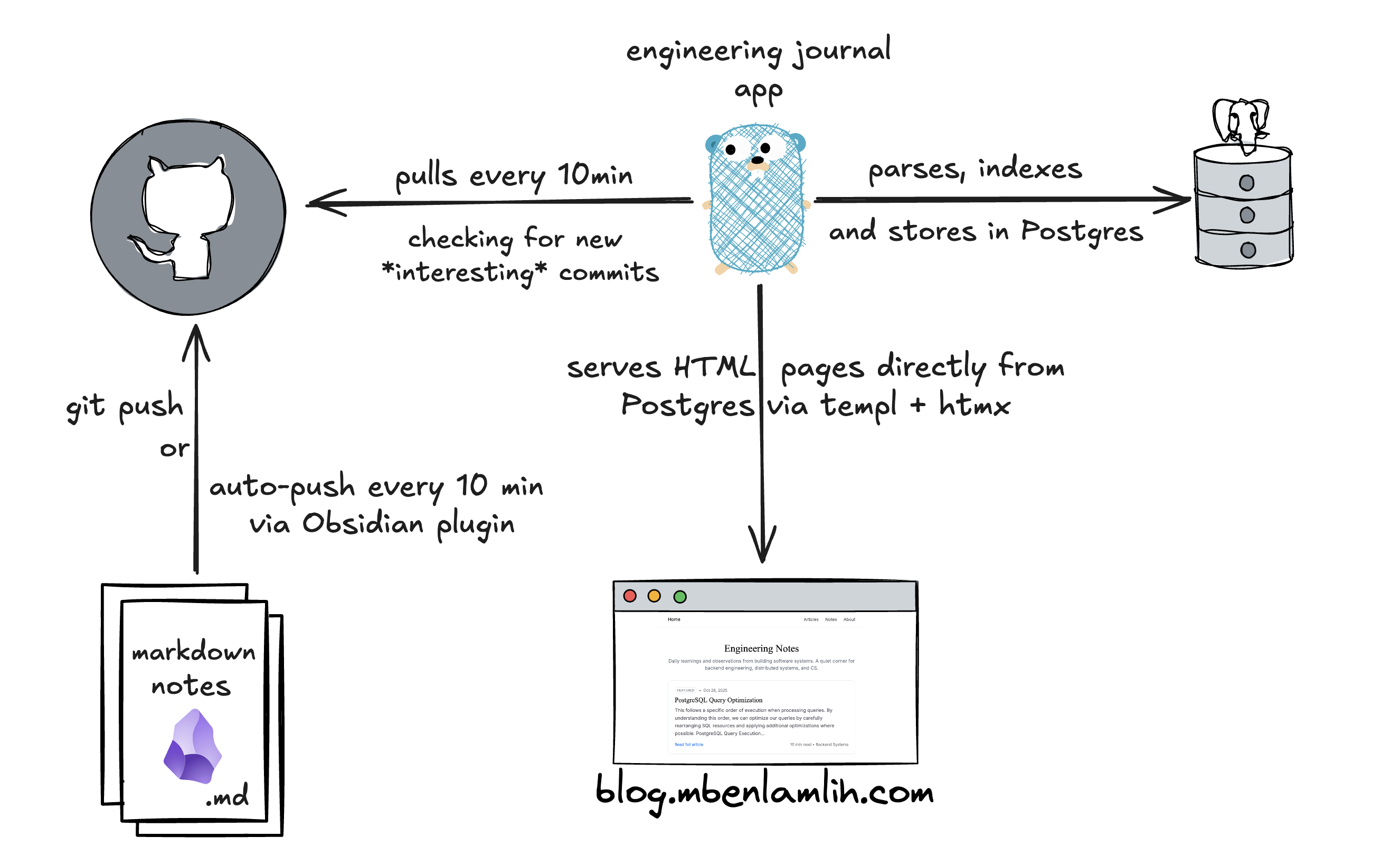
The Engineering Journal app automatically syncs with my private Obsidian vault through GitHub. Every ten minutes, an Obsidian plugin pushes any new or edited notes, and the Go app pulls the latest commits.
Since my vault contains personal notes too, the app only looks at a specific subfolder where I keep articles I want to share. The VPS has a read-only SSH key registered in GitHub, so it can securely pull just that content and ignore everything else. Once fetched, the Markdown files are parsed, converted to HTML, indexed in Postgres, and served using templ and htmx, no JavaScript frameworks, just clean, fast rendering.
Markdown Parsing
Each Markdown file starts with YAML frontmatter:
1---
2title: "Building My Engineering Journal"
3published_at: "2025-11-09T10:00:00Z"
4read_minutes: 12
5tags: ["golang", "templ", "tailwind", "dokploy"]
6featured: true
7kind: "article"
8---
Then comes the body. Goldmark handles Markdown rendering with Chroma for syntax highlighting, and Bluemonday ensures safe output.
Image and wikilink syntax are transformed automatically:
1 → 
2[[Go Parser|the parser code]] → [the parser code](/notes/go-parser)
PostgreSQL & Search
Articles are indexed in PostgreSQL using a tsvector column, with triggers keeping everything up to date automatically. This makes full-text search both fast and accurate.
Paired with htmx, it becomes a smooth, instant search experience, typing in the search bar sends live queries to the backend and only the results section of the page updates, no reloads or complex JavaScript involved:
1<input
2  type="text"
3  name="q"
4  placeholder="Search articles..."
5  autocomplete="off"
6  class="border border-line rounded-md w-full pr-3 py-2"
7  hx-get="/search"
8  hx-target="#results"
9  hx-trigger="keyup changed delay:300ms" />
This setup gives real-time search with just HTML and Go on the backend, simple, fast, and surprisingly powerful.
Deployment with Dokploy
Dokploy handles deployment directly from GitHub:
- Automatic deployment on push
- Free SSL certificates via Let's Encrypt
- Preview branches (pr-xxx.blog.mbenlamlih.com)
- Automatic rebuilds on each commit
The main branch is deployed at blog.mbenlamlih.com.
To keep things simple and cost-effective, I’m hosting everything on a small Hetzner VPS, with both PostgreSQL and the app running on the same machine, it’s more than enough for this kind of project. I also use Tailscale to secure access to the VPS, keeping it private while still easy to connect to from anywhere.
Thanks for reading.
All of this is written in my Obsidian vault and published automatically through the syncer.
0 comments
No comments yet. Be the first.